
You can file RTI online in about ten minutes on the Government of India’s RTI portal, pay the ₹10 fee by UPI or card, and track the reply without visiting any office. This guide shows each step, what to write, the deadlines and what to do if you get no answer.

Quick answer
To file RTI online with a Central Government ministry, department or other Central public authority, go to rtionline.gov.in, choose the ministry or department, type your questions (up to 3,000 characters), pay ₹10 online (no fee if you are below the poverty line) and save the registration number. The officer must reply within 30 days, or within 48 hours if a person’s life or liberty is involved. State Government offices are not covered by this portal.
Free tool: write your application in minutes with the RTI application generator, then paste the questions into RTI Online.
What you can ask under RTI
The Right to Information Act, 2005 lets any Indian citizen ask a public authority for information it holds: copies of files, records, emails, orders, file notings, progress of your application, reasons for a decision and so on. You do not have to give a reason for asking.
Some information is exempt, for example matters affecting national security, cabinet papers before a decision, or information received in confidence. Since 13 November 2025, when the Digital Personal Data Protection Rules were notified, an amended Section 8(1)(j) lets officers refuse personal information about other people, without the earlier “larger public interest” override. The Supreme Court refused to stay this change in February 2026 and has referred the challenges to a larger bench, so the amended section applies until it decides. Questions about your own records are not affected.
Who can file RTI online on rtionline.gov.in
- Any Indian citizen, for any Central Government ministry, department or public authority listed on the portal (for example the Income Tax Department, EPFO, Railways, passport offices, central universities and public sector banks registered there).
- Not for State Government departments, municipal bodies or the Government of NCT of Delhi. Applications sent to them through this portal are returned, and the fee is not refunded.
- For State offices, use your State’s own RTI portal if it has one, or send the application by post or in person to the office’s Public Information Officer.
Documents and details you need
- Your name, address, email ID (and mobile number if you want SMS alerts)
- Your questions, typed in clear, numbered points
- UPI, debit or credit card, or net banking for the ₹10 fee
- If you are below the poverty line: a scanned copy of your BPL certificate (PDF)
- Any supporting papers you want to attach, as a PDF of up to 1 MB
How to file RTI online: step by step
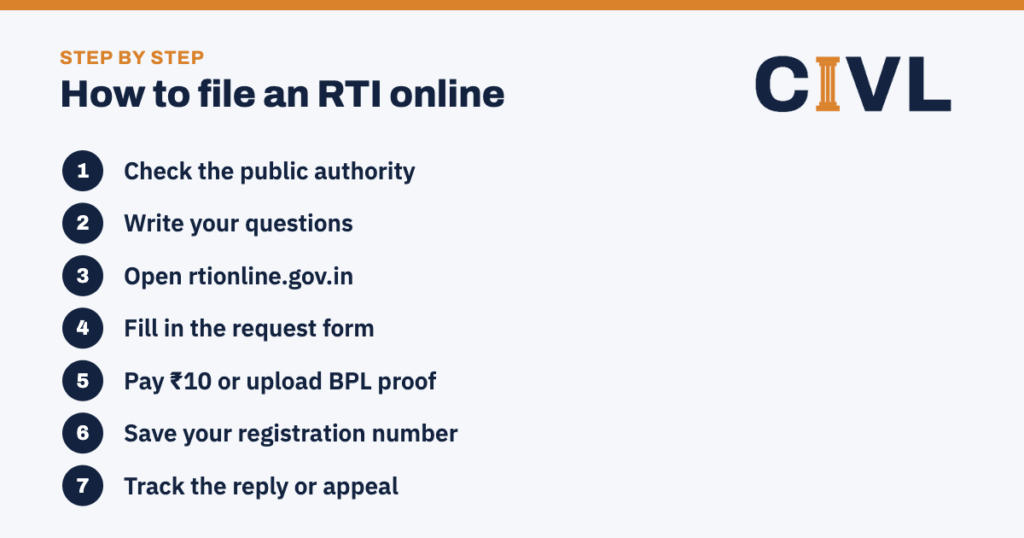
- Check the public authority. Make sure the office that holds the information is a Central Government authority. If it is a State or local office, use the State route instead.
- Write your questions. Ask for specific records or facts, in numbered points. Avoid “why” questions and opinions. Our RTI application format has sample wording.
- Open rtionline.gov.in. Click “Submit Request”, read the guidelines, tick the box and continue. Registering an account is optional.
- Fill in the request form. Choose the ministry or department, enter your details and paste your questions in the text box (up to 3,000 characters; plain letters, numbers and basic punctuation). If your text is longer, attach it as a PDF.
- Pay ₹10 or upload BPL proof. Select “No” for Below Poverty Line and pay ₹10 by UPI, card or net banking. If you select “Yes”, upload your BPL certificate; no fee is charged.
- Save your registration number. After payment, the portal shows a unique registration number and sends it by email (and SMS). The Nodal Officer forwards your request to the right Central Public Information Officer (CPIO).
- Track the reply or appeal. Use “View Status” with your registration number and email. If the CPIO asks for extra copying fees, pay them from the status page. If you get no reply in 30 days, or an unsatisfactory one, file a first appeal online.
Fees and timelines
| Item | Fee | Time limit |
|---|---|---|
| RTI application (Central) | ₹10; free for BPL applicants | Reply within 30 days |
| Life or liberty of a person involved | ₹10 | Reply within 48 hours |
| Request transferred to another authority | — | Transfer within 5 days; reply time counts from receipt there |
| Photocopies (A4/A3) | ₹2 per page | Pay when asked |
| First appeal (Central) | No fee | File within 30 days; decided in 30 to 45 days |
| Second appeal to the Central Information Commission | No fee | File within 90 days of the first appeal decision |
If you get no reply: first and second appeal
If the CPIO does not reply in 30 days, refuses wrongly, or gives incomplete information, click “Submit First Appeal” on the same portal, enter your registration number and email, pick the ground for appeal and explain in up to 3,000 characters. There is no fee. See our RTI first appeal format for wording. If the First Appellate Authority does not help, file a second appeal with the Central Information Commission within 90 days; its online system can pull your RTI and first appeal details using the first appeal registration number.
RTI for State Government offices
The central portal works only for Central Government public authorities. For a state department, municipal body, state university or state PSU:
- Check whether your state runs its own RTI online portal. Several states, including Maharashtra and Uttar Pradesh, do, and the steps are similar to the central one.
- If there is no state portal, send a paper application to the Public Information Officer of that office, with the fee in the form your state accepts (for example a court fee stamp, Indian Postal Order, demand draft or cash against receipt).
- State RTI fees and copying charges are set by state rules and can differ from the ₹10 central fee.
Examples of RTI questions that get clear answers
Ask for records the office already holds, not opinions or explanations. Compare:
| Weak question | Better question |
|---|---|
| Why has my pension not been sanctioned? | Please provide the daily progress report of my pension file no. ___ from 1 April 2026 to date, with the names and designations of the officers who handled it. |
| Is the road contractor corrupt? | Please provide a copy of the work order, measurement book entries and payments made for the road work at ___ in 2025–26. |
| When will my passport be issued? | Please provide the status of police verification for file no. ___ and the dates on which it was received and forwarded. |
If your RTI online is transferred
If you send your RTI to the wrong Central public authority, the PIO must transfer it to the right one within five days under section 6(3), and you will get an email with the new registration details. The 30-day time limit then runs from the date the right office receives it. An RTI meant for a state office cannot be transferred on the portal and is usually returned, so check the right office before you file RTI online.
Tips to file RTI online and get useful answers
- Ask for copies of documents (“certified copy of the file notings on my application no. …”) rather than explanations.
- Keep each application to one subject; split unrelated questions into separate applications.
- Mention dates, reference numbers and office names so the officer can find the record.
- Ask for inspection of files if records are bulky; it is often faster than copies.
- Download and keep the acknowledgement and payment receipt for any appeal.
Common mistakes to avoid
- Sending a State matter to a Central portal. The fee is lost and the application is returned.
- Asking hypothetical or “why” questions. RTI gives access to information that exists in records, not opinions.
- Using special characters the portal rejects. Stick to letters, numbers and basic punctuation, or attach a PDF.
- Losing the registration number. You need it to track the request and to appeal.
- Missing the 30-day appeal window. Count from the date of the reply or from day 30 if there was none.
Frequently asked questions
Can I file RTI online for a State Government office?
Not on rtionline.gov.in. Some States run their own RTI portals; otherwise send the application by post or hand it in at the office, with the fee that State’s rules require.
How much is the fee to file RTI online?
₹10 for Central public authorities, paid by UPI, card or net banking. Applicants below the poverty line pay nothing if they upload a BPL certificate.
Do I need to register on the RTI portal?
No. Registration is optional. It helps if you file often, because your details and history are saved.
What is the word limit for an RTI application?
The online text box takes up to 3,000 characters. The RTI Rules suggest about 500 words, but a longer application cannot be rejected for that reason alone. Attach a PDF if you need more space.
How do I check the status of my RTI?
Click “View Status” on rtionline.gov.in and enter your registration number, email ID and the security code.
Can I file RTI online from outside India?
Yes. Indian citizens living abroad can file RTI online on rtionline.gov.in, as long as they can pay the fee online. Replies are sent by email and through the portal.
Can I get certified copies when I file RTI online?
Yes. Ask for “certified copies” in your application. The PIO will tell you the copying fee, usually ₹2 a page for Central offices, which you can pay online through the portal.
Can I file RTI online for information about another person?
You can ask, but personal information about another person can be refused under section 8(1)(j). Information about public duties, public money and official decisions is usually given.
Where can I get a ready-to-use RTI application format?
CIVL’s RTI application format gives you sample questions and wording you can paste when you file RTI online, plus a version for filing by post.
CIVL format
Write a sharper RTI
Use CIVL’s RTI application format and, if you need it, the RTI first appeal format, and read how to file an RTI first appeal. Still stuck? Ask CIVL.