
Voter ID correction is done with Form 8 of the Election Commission of India, and it is free. You can fix a misspelt name, wrong age, old address, poor photo or a relative’s name online on the Voters’ Service Portal or the ECINET app, without visiting any office.
Quick answer
Use Form 8 on voters.eci.gov.in or the ECINET app to correct entries in the electoral roll, shift your address, get a replacement voter ID card (EPIC) or mark yourself as a person with disability. One form can cover several corrections. There is no fee.
Since September 2025, online applications are verified with an OTP sent to your Aadhaar-linked mobile number (e-sign), so the name on your voter ID and Aadhaar should match. A Booth Level Officer (BLO) checks the request and the Electoral Registration Officer (ERO) decides it, usually within about a month.
What can you change with Form 8?
| Change | Example | Proof usually needed |
|---|---|---|
| Name | Spelling mistake, change after marriage | Aadhaar, PAN, passport, Class 10 certificate, or gazette notification |
| Age or date of birth | Wrong year of birth | Birth certificate, Class 10 certificate, passport, PAN |
| Relative’s name or relation type | Father’s name misspelt | Aadhaar or other ID showing the correct name |
| Gender | Wrong gender recorded | Government ID showing the correct entry |
| Photo | Old, blurred or missing photo | A recent passport-size colour photo |
| Address within the same area | House number or street wrong | Utility bill, bank passbook, rent agreement, Aadhaar |
| Shifting residence | Moved to another constituency | Proof of the new address |
| Replacement EPIC | Card lost, damaged or old style | No proof needed beyond your details |
To add your name for the first time, use Form 6 instead. To object to someone else’s entry or delete a name (for example, of a family member who has died), use Form 7.
Before you start
- Find your EPIC number (the voter ID number on your card) or search your name on the portal using your details.
- Make sure your mobile number is linked to Aadhaar, because the e-sign OTP goes to that number.
- Keep a scanned copy of the proof for each change (JPG or PDF, small file size) and a recent photo if you are changing it.
- If your name has changed legally, keep the gazette notification or a name change affidavit. See our gazette name change guide.
Voter ID correction online: step by step
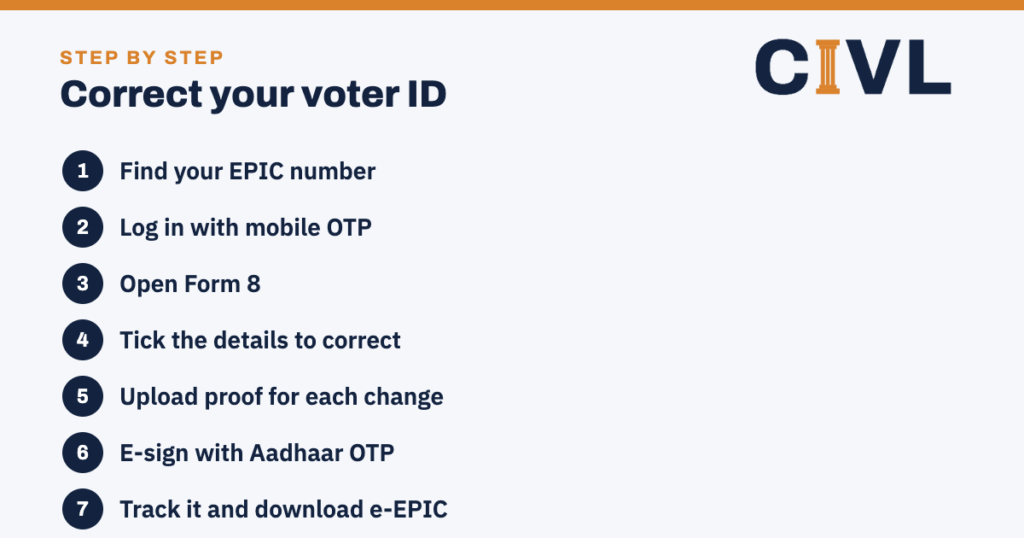
- Find your EPIC number. It is printed on your voter ID card. If you do not have it, use “Search in Electoral Roll” on the portal.
- Log in. Open voters.eci.gov.in or the ECINET app and sign in with your mobile number and OTP.
- Open Form 8. For a voter ID correction, choose “Correction of entries” (or “Shifting of residence” if you have moved).
- Tick the details to correct. Select each item, such as name, photo or date of birth, and type the correct details.
- Upload proof. Attach one document for each change.
- E-sign and submit. Verify with the OTP sent to your Aadhaar-linked mobile number. Note the reference number.
- Track and download. Use “Track Application Status”. Once approved, download the corrected e-EPIC; the new card is sent by post.
Voter ID correction offline
If you cannot make a voter ID correction online, get Form 8 from your BLO or the ERO’s office (usually at the tehsil or municipal office), fill it in, attach self-attested copies of the proofs and submit it there. You can also ask for help on the Voter Helpline number 1950. During special camps before elections, BLOs sit at polling stations to accept forms.
What happens after you apply
- The BLO may visit your address or call you to check the details of your voter ID correction.
- The ERO approves or rejects the request. If rejected, the reason is shown on the portal and you can apply again with better proof.
- Applications are usually decided in about 30 days, but it can take longer close to elections.
- After approval, the corrected e-EPIC can be downloaded from the portal or app, and a new PVC card is printed and posted to you free of cost.
- If a Special Intensive Revision (SIR) of the roll is under way in your state, follow the BLO’s instructions for that revision; corrections may be handled as part of it.
Linking Aadhaar with your voter ID
Linking your Aadhaar number with your voter ID is voluntary. It is done with Form 6B on the same portal or app. You do not need to link Aadhaar to make a voter ID correction, but the online e-sign uses your Aadhaar-linked mobile number to confirm who you are.
Shifting your address: same or different constituency
- If you move within the same constituency, use Form 8 and choose “Shifting of residence within the assembly constituency”.
- If you move to a different constituency or state, use the same Form 8 option for shifting; your entry moves to the new roll and the old one is removed.
- Apply as soon as you move, and well before an election, because rolls are frozen after the last date for nominations.
Correcting a family member’s voter ID
Each voter should apply for their own voter ID correction. For an elderly or disabled family member, you can help them fill in Form 8 online from your phone after logging in with their details, or ask the BLO to collect the form at home. Electors with disabilities can also use Form 8 to be marked as a person with disability and get help at the polling station.
What is an e-EPIC?
The e-EPIC is a secure PDF version of your voter ID card that you can download from the portal or app after logging in with the mobile number registered in the roll. It is valid as proof of identity for voting, like the PVC card, and is the fastest way to get a copy after a correction.
Documents accepted for a voter ID correction
The Election Commission accepts a range of common documents. Pick one that clearly shows the corrected detail, and make sure the scan is readable. If one document shows both your correct name and your date of birth, you can use it for both changes.
| Detail you are correcting | Documents commonly accepted |
|---|---|
| Name | Aadhaar card, PAN card, Indian passport, driving licence, Class 10 or 12 certificate, gazette notification, marriage certificate (for a change after marriage) |
| Date of birth or age | Birth certificate issued by the municipal authority or registrar, Class 10 or 12 certificate showing the date of birth, Aadhaar card, PAN card, driving licence, Indian passport |
| Address | Aadhaar card, Indian passport, a water, electricity or gas bill for that address (not older than one year), a bank or post office passbook, a registered rent or lease deed, a registered sale deed, revenue land records |
| Photo | A recent passport-size colour photo on a plain light background; no document is needed |
| Relative’s name | Any of the identity documents above showing the correct name of the parent or spouse |
If you have none of these, the BLO can verify your details in person, and some states accept other documents listed in the form guidelines. A self-declaration alone is usually not enough for a change of name or date of birth.
Correcting your photo on the voter ID
A blurred, black-and-white or very old photo is one of the most common reasons people ask for a voter ID correction. In Form 8, tick “Photograph” and upload a recent colour photo showing your full face, with no cap or dark glasses. Keep the file small, as the portal shows the size limit on the upload screen. The new photo appears on the e-EPIC and the reprinted PVC card once the ERO approves the request.
Name change after marriage
Many women change their surname, or their husband’s name is to be shown as the relative instead of the father’s name. Both can be handled in one voter ID correction: tick “Name” and “Relative’s name and relation type” in Form 8. Attach the marriage certificate and an ID in the new name, such as an updated Aadhaar. If you have also moved to your spouse’s home, choose the shifting option in the same form so that your entry moves to the new polling station. Our marriage registration guide explains how to get the certificate.
Lost, damaged or old voter ID card
You do not need a correction just to replace a card. Form 8 has a separate option for a replacement EPIC without any change in the entries, for a card that is lost, destroyed or damaged. Most people simply download the e-EPIC, which is free and valid for identity at the polling station. If you also want the details changed, tick the relevant corrections in the same form, and the replacement card will carry the corrected details.
Check your entry in the electoral roll first
Before you file a voter ID correction, search for your name on the Voters’ Service Portal. You can search by EPIC number, by your details (name, relative’s name, age and state) or by your registered mobile number. The result shows your part number, serial number and polling station. This tells you exactly what is wrong in the roll entry, which is what Form 8 corrects. The card only reflects the roll.
- If you find two entries in your name (for example, at an old and a new address), apply to remove the older one with Form 7 so that only one remains.
- If you cannot find your name at all, you are not on the roll and need Form 6, not a voter ID correction.
- If the roll shows the correct details but your card does not, ask for a replacement card or download the e-EPIC.
Voter ID correction for overseas Indians and service voters
Indian citizens living abroad who are registered as overseas electors (through Form 6A) can also apply for a voter ID correction with Form 8 on the same portal. Service voters (members of the armed forces and certain government staff posted outside their home state) are registered through a separate process managed by their record office, so they should ask that office for corrections.
If the ERO rejects your voter ID correction
A rejection is not the end of the matter. First read the reason in “Track Application Status”. Most rejections are for a blurred or mismatched document, or because the BLO could not find you at home. In these cases it is quicker to file a fresh Form 8 with better proof. If you think the decision is wrong, you can appeal against the ERO’s order to the District Election Officer under section 24 of the Representation of the People Act, 1950. You can also raise a complaint on the National Grievance Service Portal of the Election Commission or call the Voter Helpline on 1950.
Worked example: three changes in one Form 8
Priya’s voter ID shows her name as “Priya Sharmaa”, her father as the relative, and her parents’ address in Lucknow. After her marriage she moved to Kanpur with her husband. She logs in on voters.eci.gov.in, opens Form 8, and in one application ticks “Shifting of residence” (outside the constituency), “Name” and “Relative’s name and relation type”. She uploads her updated Aadhaar card as proof of the new name and address, and the marriage certificate for the relation change. She e-signs with the OTP on her Aadhaar-linked mobile number and notes the reference number.
A BLO in Kanpur visits to confirm she lives at the new address. About four weeks later the status shows “Accepted”. She downloads the e-EPIC with the corrected name, her husband as the relative and the Kanpur polling station; the PVC card reaches her by post later. Her old Lucknow entry is removed automatically, so she is not left with two entries.
Tips for a quick voter ID correction
- Apply early, outside the run-up to an election, when BLOs have fewer forms to check.
- Match the spelling in Form 8 exactly with your proof document, letter by letter.
- Keep the mobile number in your roll entry current, so that you can log in and download the e-EPIC later.
- Save the acknowledgement and reference number; you need them to track or escalate the request.
- Answer the BLO’s call or visit, as an unverified address is a common reason for rejection.
Common mistakes to avoid
- Using Form 6 for a voter ID correction. That creates a second, duplicate entry.
- Uploading one document for many changes when it does not show all of them.
- Applying with a mobile number that is not linked to Aadhaar, so the e-sign fails.
- Using a different spelling of your name from the one on Aadhaar.
- Shifting your address in the roll but not to the right constituency, or keeping two entries in two places. The law allows only one entry (Representation of the People Act, 1950, s.17), and a false declaration in a form is punishable (s.31).
Frequently asked questions
Is there a fee for voter ID correction?
No. Form 8 is free, online or offline, and so is the replacement card.
How long does voter ID correction take?
Usually about 30 days after you apply, depending on BLO verification and how close the next election is.
Can I change my address and name in one application?
Yes. Form 8 lets you tick several corrections at once, as long as you attach proof for each.
Do I need Aadhaar for voter ID correction online?
Online applications are verified by an OTP to your Aadhaar-linked mobile number. If you cannot do that, apply offline through your BLO or ERO.
How do I get a new voter ID card after correction?
Download the e-EPIC from voters.eci.gov.in or the ECINET app once the correction is approved. The new card is also posted to your address.
Can I vote while my voter ID correction is pending?
Yes, if your name is already on the electoral roll. You can vote with your existing card or another approved photo ID.
Can I use Form 8 to correct my mobile number?
Yes. Form 8 lets you update the mobile number in your roll entry, which you need for logging in and downloading the e-EPIC.
What if my voter ID correction is rejected?
The reason is shown in the status. Apply again with clearer or better proof, or contact your ERO. You can also call the Voter Helpline on 1950.
Can I correct my voter ID card if I have lost it?
Yes. Tick the correction you need in Form 8 and also request a replacement card. Or download the e-EPIC after the voter ID correction is approved.
Which documents are accepted as address proof for voter ID correction?
Aadhaar, passport, a recent utility bill, a bank or post office passbook, a registered rent deed or sale deed, and revenue land records are commonly accepted.
Can I appeal if my voter ID correction is rejected?
Yes. You can apply again with better proof, or appeal against the ERO’s order to the District Election Officer under section 24 of the Representation of the People Act, 1950.
Where can I get an affidavit for a voter ID correction of name or address?
Use the CIVL name change affidavit or the address proof affidavit if you lack other proof.
CIVL format
Papers that help with corrections
Use the name change affidavit or the address proof affidavit. Read our guides to Aadhaar address update and gazette name change, or ask CIVL a question.